DataCockpit


The DataCockpit module is the successor of the Web Monitor and Portal modules. The functionalities of the old modules are included in the new one. In addition, the new functionality Workflows is available. A license is required for this add-on module .
Log Search (functionality of the old module Web Monitor)
Start Process (functionality of the old module Web Monitor)
Forms (functionality of the old module Portal)
Workflows (new functionality)
Installation
There are two installation options for the module. With and without DMZ server.
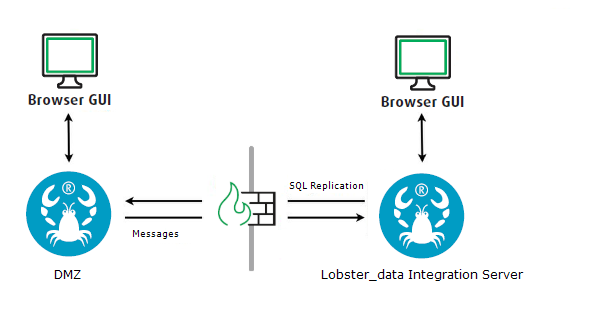
Installation without DMZ Server
The configuration file ./etc/startup.xml must have the following entry.
<Call name="addApplication"> <Arg> <New class="de.lobster.webmon.apps.WebMonitor"> <Set name="forceSSL">false</Set> <Set name="alias">hub</Set> <Set name="remoteHost"/> <Set name="remotePort">8020</Set> <Set name="ldapAlias"/> <Set name="retainHeaderLogs">90</Set> <Set name="cleanUpTime">2</Set> <Set name="serverName">Main Server</Set> </New> </Arg></Call>In addition, a mail server must be configured in the same file (if this is not already the case).
<!-- mail server settings --><Call name="addApplication"> <Arg> <New class="com.ebd.util.net.mail.HubStartupConfiguration"> <Call name="setMailSettings"> <!--SMTP via TLS should be used <Arg>smtps</Arg> --> <Arg>localhost</Arg> <Arg type="int">25</Arg> <Arg>my_password_obfuscated</Arg> </Call> <!-- Uncomment the next line and set with fitting values to change the list of mechanisms to be used for authentication --> <!-- <Set name="sMTPAuthMechanisms">LOGIN PLAIN MD5-DIGEST NTLM</Set> --> </New> </Arg></Call>Installation with DMZ Server
Logs are only kept on the inner Integration Server. Another database instance (schema) is installed on the DMZ server and filled with the necessary logs by the inner Integration Server (replication).
File contents, on the other hand, (i.e. input and output files, not configuration files) are not replicated, but delivered on demand from the inner Integration Server (via the DMZ server) to the DataCockpit client by the MessageService (default port 8020).
Setting up a Database (on DMZ Server)
This example assumes a MySQL database. Create a new database instance as database administrator (here datacockpit) and a database user (here myuser) on the DMZ server.
./etc/database.xml (on DMZ Server)
Now enter the newly created schema in configuration file ./etc/database.xml on the DMZ server. This database instance must be accessible via TCP/IP from the inner Integration Server and the database user must have appropriate permissions.
Example:
<Call name="initPool"> <Arg> <New class="com.ebd.hub.services.database.DatabaseSettings"> <Set name="alias">datacockpit</Set> <Set name="allowGrowing">true</Set> <Set name="database">jdbc:mysql://localhost:3306/datacockpit?useSSL=false&characterEncoding=UTF8&useJDBCCompliantTimezoneShift=true&useLegacyDatetimeCode=false&serverTimezone=Europe/Berlin&allowPublicKeyRetrieval=true</Set> <Set name="driver">com.mysql.cj.jdbc.Driver</Set> <Set name="user">myuser</Set> <Set name="password">OBF:1wtm1xtz1w8v1xtj1wus</Set> <Set name="minSize">2</Set> <Set name="maxSize">30</Set> <Set name="idleTime">300000</Set> <Set name="sqlCommand">select 1 from dual</Set> <Set name="rollback">true</Set> <Set name="caching">true</Set> <Set name="catalogName">datacockpit</Set> </New> </Arg></Call>./etc/startup_dmz.xml (on DMZ Server)
Now please enter the following section in configuration file ./etc/startup_dmz.xml.
<Call name="addApplication"><Arg> <New class="de.lobster.webmon.apps.WebMonitor"> <Set name="forceSSL">false</Set> <Set name="alias">datacockpit</Set> <Set name="remoteHost">192.168.0.99</Set> <Set name="remotePort">8020</Set> <Set name="ldapAlias"/> <Set name="retainHeaderLogs">999</Set> <Set name="cleanUpTime">2</Set> <Set name="serverName">Main Server</Set> </New></Arg></Call>|
Parameter |
Description |
|
remoteHost |
The IP/URL of the inner Integration Server must be entered here. |
|
remotePort |
See parameter remoteHost. |
|
retainHeaderLogs |
Sets the retention time of the log entries in days. Detail logs are retained as long as specified in Lobster_data (profile-dependent). |
|
cleanUpTime |
Specifies the time (24 hours, integer) when obsolete log entries are to be deleted. |
In addition, a mail server must be configured in the same file (if this is not already the case).
<!-- mail server settings --><Call name="addApplication"> <Arg> <New class="com.ebd.util.net.mail.HubStartupConfiguration"> <Call name="setMailSettings"> <!--SMTP via TLS should be used <Arg>smtps</Arg> --> <Arg>localhost</Arg> <Arg type="int">25</Arg> <Arg>my_password_obfuscated</Arg> </Call> <!-- Uncomment the next line and set with fitting values to change the list of mechanisms to be used for authentication --> <!-- <Set name="sMTPAuthMechanisms">LOGIN PLAIN MD5-DIGEST NTLM</Set> --> </New> </Arg></Call>./etc/database.xml (on Inner Server)
This file must be adapted in the same way as on the DMZ server, but the IP/URL of the DMZ server must be used for the connection string (parameter database). See <Set name="dmzHost">DMZ_IP_Address</Set> in configuration file ./etc/startup.xml of the inner Integration Server.
./etc/startup.xml (on Inner Server)
This file must be adapted as on the DMZ server (./etc/startup_dmz.xml), but the remoteHost parameter must remain empty!
In addition, the following line must be commented in for the replication of the logs and the on-demand delivery of file contents.
<Set name="webMonitorAlias">datacockpit</Set>Users
DataCockpit has a default user admin with password admin. Please change the password or create a new DataCockpit user. See also sections SSO (Users) and Two Factor Authentication (Users).
Address
|
http(s)://<IP_or_URL_of_Integration_Server_or_DMZ>/DataCockpit http(s)://<IP_or_URL_of_Integration_Server_or_DMZ>/DataCockpit/?user=<user>&password=<password>&language=de Note: See section Adding an HTTPS Listener. |
Language Codes
|
Language |
Code |
|
German |
de |
|
English |
en |
|
Spanish |
es |
|
French |
fr |
|
Italian |
it |
|
Danish |
da |
|
Dutch |
nl |
Login with Token
|
http://<IP_or_URL_of_Integration_Server_or_DMZ>/webmonitor/Interceptor?user=<user>&password=<password>&language=de https://<IP_or_URL_of_Integration_Server_or_DMZ>/webmonitor/Interceptor?user=<user>&password=<password>&language=de |
In response, you will receive a token string of the following type. The validity period is 15 minutes.
1661755355467005731743:33703602516:533663474105103177626
In a further call, which uses the token string, the actual login takes place.
|
http://<IP_or_URL_of_Integration_Server_or_DMZ>/DataCockpit?token=<token_string>&user=<user> https://<IP_or_URL_of_Integration_Server_or_DMZ>/DataCockpit?token=<token_string>&user=<user> |
So for example: http://localhost/DataCockpit?token=1661755355467005731743:33703602516:533663474105103177626&user=myuser
Important note: Please note that some characters are reserved in a URL. One solution would be to not use these characters in the user or password. However, special characters do of course have their purpose in passwords for security. Alternatively, you can then URL-encode your password before entering it in the URL. See function URL-encode(text a, encoding b, space-handling c), for example.